Silent failure protection
If the AI response is empty, a placeholder, or the API fails, the lead is still saved with an AI draft unavailable flag and the team is alerted.
Lead Capture and CRM Sync
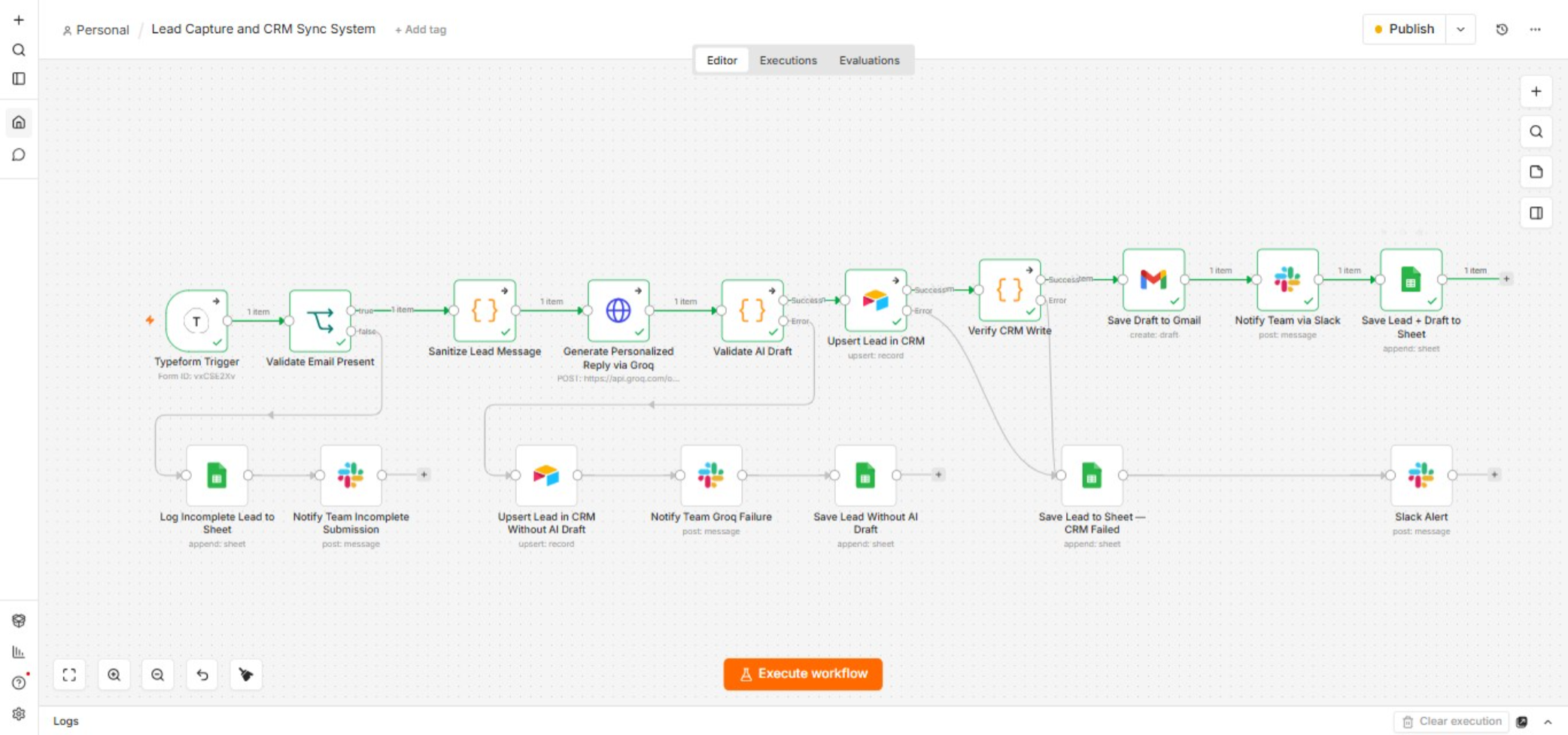
A practical system that captures website leads, validates them, syncs to CRM, and notifies the team only after the write is verified.
Built With
n8n
Typeform
Groq AI
Gmail
Slack
Airtable / CRM
Google Sheets
Workflow Overview
The Real Problem
A prospect fills out the contact form late on a Friday. By the time someone checks it on Monday, that prospect may already have a reply from a competitor.
Every lead needs the same manual work in between. Check if the details are valid. Copy them into the CRM. Write a reply. Tell the team. Each of those steps is a place where a lead can quietly slip through.
What This System Handles
-
1
Validates every submission
Checks email and name. If required fields are missing, the lead is logged to Incomplete Leads and the team is alerted on Slack. -
2
Sanitizes the message
Long messages are trimmed to 500 characters to keep AI calls efficient. -
3
Generates an AI reply draft
Groq AI creates a personalized draft. The system checks whether the response is valid or failed silently. -
4
Verifies the CRM write before notifying
The system re-reads what was written to confirm nothing was dropped. Only then does it create the Gmail draft and send the Slack notification.
Designed for Reliability
Verification before notification
The system checks its own write before notifying anyone. The team is only alerted about leads that were saved correctly.
The system checks its own write before notifying anyone. The team is only alerted about leads that were saved correctly.
Who This Is For
This setup works best for property businesses, service providers, and B2B teams that collect website leads and need reliable CRM sync with team alerts.
Why It Matters
Manual lead handling does not scale past a handful of submissions a day. A missed follow-up is not just a missed task. It is a missed conversation.
This system validates, syncs, drafts, and verifies before the team is notified, so leads are less likely to disappear into a silent failure.
Frequently Asked Questions
Does this send replies automatically?
No. It creates a Gmail draft for review. The team still decides what goes out.
What happens if required fields are missing?
The submission is logged to Incomplete Leads and the team is alerted on Slack.
What if the AI draft fails?
The lead is still saved with an AI draft unavailable flag and the team is notified.
Is this published on n8n?
Yes. It is available as an official n8n workflow template.
Discuss a Similar Workflow
If website leads are getting lost between form and CRM, share a few details below. I will get back to you on email.
Your message will be sent to [email protected]