Duplicate prevention
Matching is done on email. An existing row is updated instead of creating a duplicate.
Lead Segmentation and AI Scoring
A practical system that separates serious buyers from casual enquiries so the sales team can prioritise the right conversations first.
Built With
n8n
Groq AI
Google Sheets
Gmail
JavaScript (Code Node)
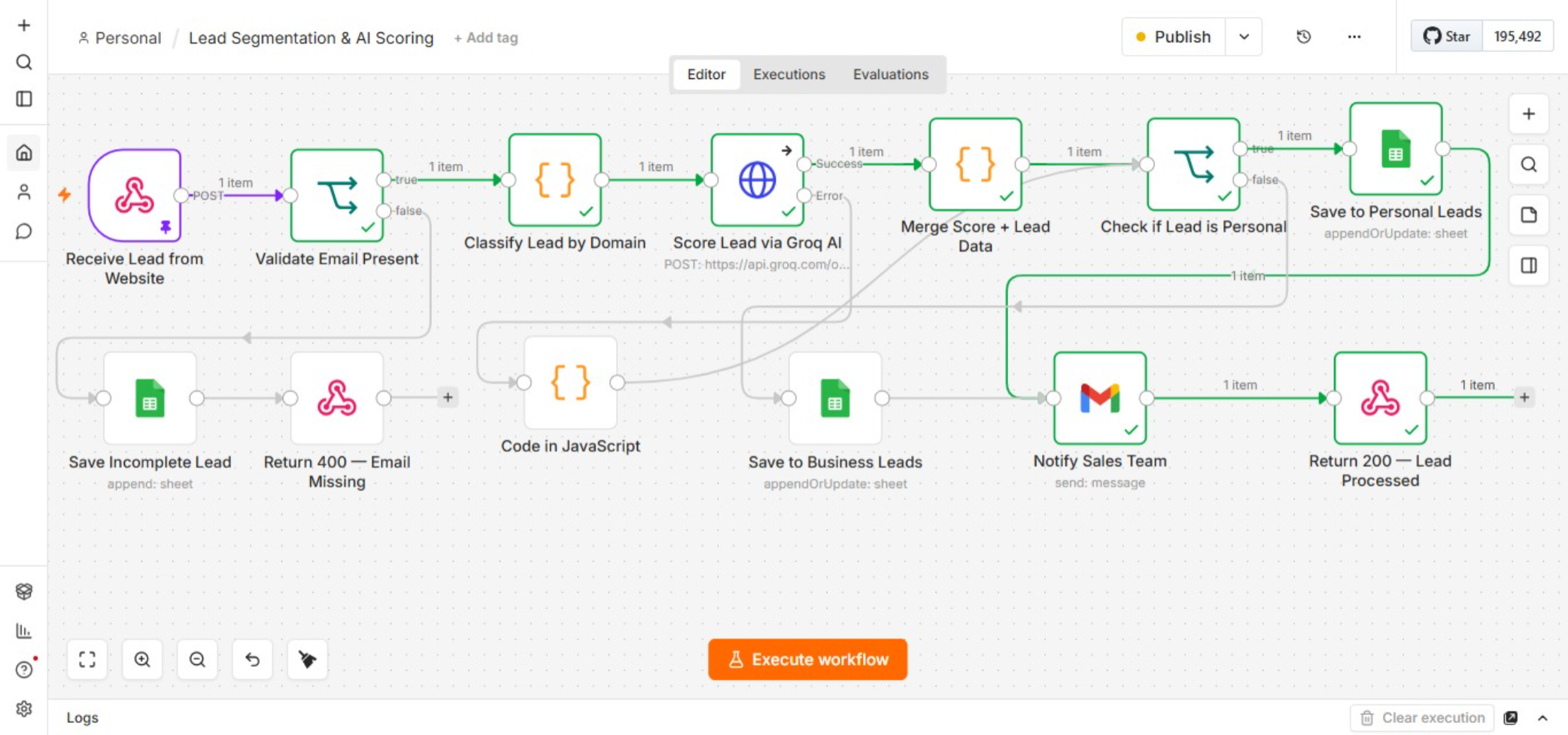
Workflow Overview
The Real Problem
A serious buyer ready to move this month and someone just browsing can submit the same enquiry form.
Without a way to tell them apart, both sit in the same queue. The sales team spends equal time on low intent questions and on leads that were ready to close.
What This System Handles
-
1
Captures and validates each lead
A webhook receives the form submission. If the email is missing, the lead is logged as incomplete and a 400 response is returned. -
2
Classifies by email domain
The system checks the domain against personal providers such as Gmail, Yahoo, and Outlook, then tags the lead as Personal or Business. -
3
Scores buying intent with AI
Lead details are sent to Groq AI for a 1 to 10 buying intent score. If the AI call fails, the lead is still saved and flagged. -
4
Routes and notifies the team
Personal leads go to one sheet and business leads to another. The sales team gets an email with the details and score.
Designed for Reliability
AI failure fallback
If scoring fails, the lead is still saved and flagged. A missing score is never treated as something else.
If scoring fails, the lead is still saved and flagged. A missing score is never treated as something else.
Who This Is For
This setup works best for real estate teams, sales teams, and marketing teams that receive mixed inbound leads and need a simple way to prioritise follow up.
Why It Matters
The goal is not to replace sales judgment. The goal is to stop high intent leads from waiting behind low intent enquiries.
The system sorts and scores first. The team still decides how to follow up.
Frequently Asked Questions
How is a lead scored?
Lead details are sent to Groq AI and returned as a buying intent score from 1 to 10.
What if the AI call fails?
The lead is still saved and flagged. The process does not stop just because scoring failed.
How are duplicates handled?
The system matches on email and updates the existing row instead of creating another entry.
Where do leads get stored?
Personal and business leads are routed to separate Google Sheets, and the sales team is notified by email.
Discuss a Similar Workflow
If lead prioritisation is slowing your follow up, share a few details below. I will get back to you on email.
Your message will be sent to [email protected]